
.Net MVC网站中配置文件的读写
2020-02-28 16:00:13来源:爱站网 阅读 ()

网站开发的时候要设置很多内容,如果我们需要创建文件,需要保存到数据库中,以下是爱站技术频道小编整理的.Net MVC网站中配置文件的读写,希望对你有帮助。
<configuration>
 <configSections>
 <section name="entityFramework" type="System.Data.Entity.Internal.ConfigFile.EntityFrameworkSection, EntityFramework, Version=6.0.0.0, Culture=neutral, PublicKeyToken=b77a5c561934e089" requirePermission="false" />
 <!--这里可以定义配置节 -->
 <!-- For more information on Entity Framework configuration, visit http://go.microsoft.com/fwlink/?LinkID=237468 -->
 </configSections>
但是把大量的配置都写入这里也会造成web.config的臃肿,可以采用把配置节定义在这里,把具体配置信息保存在其他文件中。?
以上传配置信息为例,看一下理想的结构?

Config\Upload.config的内容?
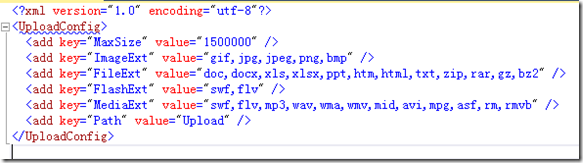
1、配置的元素。采用<add />的形式,是一个键和值得表示形式。<add key="MaxSize" value="1500000" />。?
2、元素的集合,里面定义一系列的元素。<UploadConfig>……</UploadConfig>?
3、自定义节,表示自定义的一个节点。<section name="UploadConfig"? type="Ninesky.Models.Config.UploadConfig, Ninesky.Models"/>?
name:节点名,type:处理节点的类行,逗号前是类名,逗号后是缩在程序集。
我们要创建这个类来管理配置?
一、创建键,值元素类。?
里面只有两个读写属性key和value,内容非常简单?
using System.Configuration;

namespace Ninesky.Models.Config
{
 /// <summary>
 /// 键值元素类
 /// <remarks>
 /// 创建:2014.03.09
 /// </remarks>
 /// </summary>
 public class KeyValueElement:ConfigurationElement
 {
  /// <summary>
  /// 键
  /// </summary>
  [ConfigurationProperty("key",IsRequired=true)]
  public string Key {
   get { return this["key"].ToString(); }
   set { this["key"] = value; }
  }
  /// <summary>
  /// 值
  /// </summary>
  [ConfigurationProperty("value")]
  public string Value
  {
   get { return this["value"].ToString(); }
   set { this["value"] = value; }
  }
 }
}
二、创建元素集合类。内容很简单都进行了注释?
using System;
using System.Configuration;

namespace Ninesky.Models.Config
{
 /// <summary>
 /// 元素集合类
 /// <remarks>
 /// 创建:2014.03.09
 /// </remarks>
 /// </summary>
 [ConfigurationCollection(typeof(KeyValueElement))]
 public class KeyValueElementCollection:ConfigurationElementCollection
 {
  //忽略大小写
  public KeyValueElementCollection() : base(StringComparer.OrdinalIgnoreCase) { }
  /// <summary>
  /// 集合中指定键的元素
  /// </summary>
  /// <param name="name"></param>
  /// <returns></returns>
  new public KeyValueElement this[string name]
  {
   get { return (KeyValueElement)base.BaseGet(name); }
   set
   {
    if (base.Properties.Contains(name)) base[name] = value;
    else base.BaseAdd(value);
   }
  }
  /// <summary>
  /// 创建新元素.
  /// 必须重写
  /// </summary>
  /// <returns></returns>
  protected override ConfigurationElement CreateNewElement()
  {
   return new KeyValueElement();
  }
  /// <summary>
  /// 获取元素的键
  /// </summary>
  /// <param name="element"></param>
  /// <returns></returns>
  protected override object GetElementKey(ConfigurationElement element)
  {
   return ((KeyValueElement)element).Key;
  }
 }
}
三、配置节类?
类中定义私有属性KeyValues。进行读写配置节集合,然后定义一系列的需要的配置属性,操作就是对KeyValues的元素读写。?
using System.Configuration;

namespace Ninesky.Models.Config
{
 /// <summary>
 /// 上传设置配置节
 /// <remarks>
 /// 创建:2014.03.09
 /// </remarks>
 /// </summary>
 public class UploadConfig:ConfigurationSection
 {
  private static ConfigurationProperty _property = new ConfigurationProperty(string.Empty, typeof(KeyValueElementCollection), null, ConfigurationPropertyOptions.IsDefaultCollection);
  /// <summary>
  /// 配置列表
  /// </summary>
  [ConfigurationProperty("", Options = ConfigurationPropertyOptions.IsDefaultCollection)]
  private KeyValueElementCollection KeyValues
  {
   get { return (KeyValueElementCollection)base[_property]; }
   set { base[_property] = value; }
  }
  /// <summary>
  /// 最大大小
  /// </summary>
  public int MaxSize
  {
   get
   {
    int _value =0;
    if (KeyValues["MaxSize"] != null) int.TryParse(KeyValues["MaxSize"].Value, out _value);
    return _value;
   }
   set
   {
    if (KeyValues["MaxSize"] == null) KeyValues["MaxSize"] = new KeyValueElement() { Key = "MaxSize", Value = value.ToString() };
    else KeyValues["MaxSize"].Value = value.ToString();
   }
  }

  /// <summary>
  /// 上传目录
  /// 为应用程序目录起的文件夹名,前面不带~/
  /// </summary>
  public string Path
  {
   get
   {
    if (KeyValues["Path"] == null) return "Upload";
    return KeyValues["Path"].Value;
   }
   set
   {
    if (KeyValues["Path"] == null) KeyValues["Path"] = new KeyValueElement() { Key = "Path", Value = value };
    else KeyValues["Path"].Value = value;
   }
  }

  /// <summary>
  /// 允许上传的图片类型文件扩展,多个用“,”隔开
  /// </summary>
  public string ImageExt
  {
   get
   {
    if (KeyValues["ImageExt"] == null) return string.Empty;
    return KeyValues["ImageExt"].Value;
   }
   set
   {
    if (KeyValues["ImageExt"] == null) KeyValues["ImageExt"] = new KeyValueElement() { Key = "ImageExt", Value = value };
    else KeyValues["ImageExt"].Value = value;
   }
  }

  /// <summary>
  /// 允许上传的Flash类型文件扩展,多个用“,”隔开
  /// </summary>
  public string FlashExt
  {
   get
   {
    if (KeyValues["FlashExt"] == null) return string.Empty;
    return KeyValues["FlashExt"].Value;
   }
   set
   {
    if (KeyValues["FlashExt"] == null) KeyValues["FlashExt"] = new KeyValueElement() { Key = "FlashExt", Value = value };
    else KeyValues["FlashExt"].Value = value;
   }
  }

  /// <summary>
  /// 允许上传的媒体类型文件扩展,多个用“,”隔开
  /// </summary>
  public string MediaExt
  {
   get
   {
    if (KeyValues["MediaExt"] == null) return string.Empty;
    return KeyValues["MediaExt"].Value;
   }
   set
   {
    if (KeyValues["MediaExt"] == null) KeyValues["MediaExt"] = new KeyValueElement() { Key = "MediaExt", Value = value };
    else KeyValues["MediaExt"].Value = value;
   }
  }

  /// <summary>
  /// 允许上传的文件类型文件扩展,多个用“,”隔开
  /// </summary>
  public string FileExt
  {
   get
   {
    if (KeyValues["FileExt"] == null) return string.Empty;
    return KeyValues["FileExt"].Value;
   }
   set
   {
    if (KeyValues["FileExt"] == null) KeyValues["FileExt"] = new KeyValueElement() { Key = "FileExt", Value = value };
    else KeyValues["FileExt"].Value = value;
   }
  }
 }
}
四、读取配置?
也是最关系的,配置信息怎么读出来。在上面类写好后读取非常容易了,只需用WebConfigurationManager.OpenWebConfiguration("~"). GetSection()获取配置节的实例,局可以使用属性值了?
var _uploadConfig = System.Web.Configuration.WebConfigurationManager.OpenWebConfiguration("~").GetSection("UploadConfig") as Ninesky.Models.Config.UploadConfig;
   //文件最大限制
   int _maxSize = _uploadConfig.MaxSize;
   //文件路径
   string _fileParth = _uploadConfig.Path ;
   string _dirName;
   //允许上传的类型
   Hashtable extTable = new Hashtable();
   extTable.Add("image", _uploadConfig.ImageExt);
   extTable.Add("flash", _uploadConfig.FileExt);
   extTable.Add("media", _uploadConfig.MediaExt);
   extTable.Add("file", _uploadConfig.FileExt);
五、写入配置
?跟读取类似,把属性值设置后save()一下,内容就会保存到Config\Upload.config中。?
代码如下:?
var _uploadConfig = System.Web.Configuration.WebConfigurationManager.OpenWebConfiguration("~").GetSection("UploadConfig") as Ninesky.Models.Config.UploadConfig;
   //文件最大限制
   int _maxSize = _uploadConfig.MaxSize;
   _uploadConfig.FileExt = "doc,docx,xls,xlsx,ppt,htm,html,txt,zip,rar,gz,bz2";
   _uploadConfig.FlashExt = "swf,flv";
   _uploadConfig.ImageExt = "gif,jpg,jpeg,png,bmp";
   _uploadConfig.MediaExt = "swf,flv,mp3,wav,wma,wmv,mid,avi,mpg,asf,rm,rmvb";
   _uploadConfig.Path = "Upload";
   _uploadConfig.CurrentConfiguration.Save();
以上就是爱站技术频道小编介绍的.Net MVC网站中配置文件的读写知识,要是我们一直卡住的话,建议看看小编为大家介绍的知识,可以让大家激发创作。
原文链接:https://js.aizhan.com/develop/aspnet/11794.html
如有疑问请与原作者联系
版权申明:本站文章部分自网络,如有侵权,请联系:west999com@outlook.com
特别注意:本站所有转载文章言论不代表本站观点,本站所提供的摄影照片,插画,设计作品,如需使用,请与原作者联系,版权归原作者所有

- asp.net源程序编译为dll文件并调用的实现过程 2020-03-29
- Asp.net MVC SignalR来做实时Web聊天实例代码 2020-03-29
- ASP.NET MVC中jQuery与angularjs混合应用传参并绑定数据 2020-03-29
- Asp.Net中WebForm的生命周期 2020-03-29
- ASP.NET使用Ajax返回Json对象的方法 2020-03-23
IDC资讯: 主机资讯 注册资讯 托管资讯 vps资讯 网站建设
网站运营: 建站经验 策划盈利 搜索优化 网站推广 免费资源
网络编程: Asp.Net编程 Asp编程 Php编程 Xml编程 Access Mssql Mysql 其它
服务器技术: Web服务器 Ftp服务器 Mail服务器 Dns服务器 安全防护
软件技巧: 其它软件 Word Excel Powerpoint Ghost Vista QQ空间 QQ FlashGet 迅雷
网页制作: FrontPages Dreamweaver Javascript css photoshop fireworks Flash
